How to Remove the Gemini Watermark: Pick Your Situation
Three ways to get the sparkle logo off a Gemini image: a free, no-upload browser tool; the eraser on your phone; or switching the watermark off at the source.
Remove the Gemini Watermark from an Image (Free, In Your Browser)
A reverse alpha blending tool restores the exact pixels under the sparkle — no repaint, no blur. Drop your PNG, JPG, or WebP in; everything runs in your browser, nothing uploads.
The current mark is a known quantity — 48×48 px, 96 px from the bottom right corner — so exact reversal works. Use the original export: screenshots leave ghost edges.

Removing the Gemini Logo from Nano Banana Images
Nano Banana’s Gemini badge is the same overlay in a different position; auto-detection catches it, including July’s restyled variants.
How to Remove the Gemini Logo from an Image for Free (No New Apps)
Phone and desktop erasers all remove the logo; they differ in what else changes.
Google Photos Magic Eraser — and Its Resolution Cost
Open the image, tap Edit, then Tools, then Magic Eraser, and brush over the sparkle. The catch: our lossless 1.6 MB PNG came back as a 0.25 MB JPEG — same pixels, softer tweed. Fine for a story post, wrong for print.

Original (watermarked)

Google Photos Magic Eraser — re-encoded JPEG

Reverse alpha blending — pixels restored
How to Remove the Gemini Watermark in Canva
Canva’s Magic Eraser works too, but it’s paid and it repaints — expect smears where the Gemini badge crossed skin or fabric.
Remove Gemini Watermark in Photoshop
Photoshop’s generative fill clears the corner in seconds if you already pay for it; for one image, overkill.
Skip the Watermark at the Source
If you can regenerate the image, you may not need a remover at all.
Turn Off the Gemini Watermark in Google Flow (Visible Watermarking)
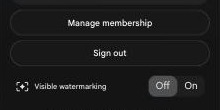
Google Flow now has a switch: click your avatar; Visible watermarking sits at the bottom of the menu, under Sign out. We flipped it in August 2026 — images exported clean, though files still carry Google’s C2PA credentials. India, South Korea, and Vietnam block the toggle by law; claims that no such setting exists are outdated.
The Gemini Remove-Watermark Prompt — Why It Backfires
The remove-the-watermark prompt makes Gemini repaint the whole picture — the logo goes, and so does detail everywhere else. For source-clean output, generate in AI Studio; those exports ship without the visible mark.
What Removal Can’t Change
Every method here removes pixels you can see, nothing more. SynthID stays woven into the image — Gemini will still identify its own work if asked. Removal is cleanup for your own content; disclosure rules still apply.
FAQ
Is it illegal to remove the Gemini watermark?
No law bans removing the visible logo from images you generated yourself. Use is what matters: several countries — India, South Korea, Vietnam — mandate AI labeling, and most platforms require disclosure regardless of watermarks. Cleaning the corner doesn’t change what you must declare.
Can you remove the AI watermark from Gemini?
The visible sparkle, yes — reverse alpha blending or any object eraser takes it off. The invisible layer, no: SynthID survives cropping, compression, even photographing a print, so the image stays identifiable as AI-generated by Google’s detector. No remover on this page touches it.
How to get rid of Google AI watermark?
Three free routes: a browser-based remover that keeps original resolution, Google Photos’ Magic Eraser if you’ll accept a smaller re-render, or generating watermark-free in Google Flow or AI Studio. Which fits depends on whether you still have the original prompt.
Will Gemini Advanced remove the watermark for me?
No. Paid Gemini app tiers still stamp the sparkle on image exports, and asking the model to erase it repaints the whole picture. Watermark-free output comes from AI Studio or Flow with visible watermarking off — or clean the file afterward.
Remove it now, in your browser
Drop in the original export. The tool draws the verified 48×48 region, magnifies the corner 4×, and shows the exact PNG before any download. Nothing uploads.
Open the Gemini logo remover