How Big Is the Gemini Watermark, and Where Exactly Does It Sit?
Here is the short answer from our own measurements: on current Gemini Web exports, the visible sparkle occupies a 48×48 pixel region in the bottom-right corner, with 96 pixels of margin between the region and both the right and bottom edges. We verified this on 1024×1024, 1376×768, and 768×1376 outputs in July 2026, and on 1408×768 in August 2026 after Gemini Web changed its landscape export width. Most pages covering the gemini watermark size repeat a second-hand rule table instead of measuring — and those tables disagree with each other, which is exactly why this article states its measurement basis first.
The measured size in pixels: one 48×48 region, four export dimensions
The visible watermark region measured 48×48 pixels on all four export dimensions we tested. That includes square 1024×1024 images, landscape 1376×768 and 1408×768, and portrait 768×1376 outputs — the region does not scale with the canvas on these dimensions. The mark itself is a white four-point sparkle with soft semi-transparent edges, composited into the pixels rather than attached as a removable layer.
| Export dimensions | Visible region | Right / bottom margin |
|---|---|---|
| 1024×1024 | 48×48 px | 96 / 96 px |
| 1376×768 | 48×48 px | 96 / 96 px |
| 1408×768 | 48×48 px | 96 / 96 px |
| 768×1376 | 48×48 px | 96 / 96 px |
Measurement basis, stated plainly: these numbers come from decoding original PNG exports from one Gemini Web account on July 15, 2026, plus a follow-up batch from the same account on August 9, 2026 that added the 1408×768 landscape row, and locating the region against a solved per-pixel alpha map. They are bounded observations, not a universal specification — a different product surface, plan, or model version can behave differently.
Gemini watermark position: exact offsets from the corner
The region sits in the bottom-right corner with 96 pixels of margin on both sides: measuring from the right edge of the image to the right edge of the 48×48 region gives 96 pixels, and the same from the bottom. Put differently, on a 1024×1024 export the region spans from x=880 to x=928 horizontally and y=880 to y=928 vertically — its left edge starts 144 pixels in from the right (96 margin + 48 region).
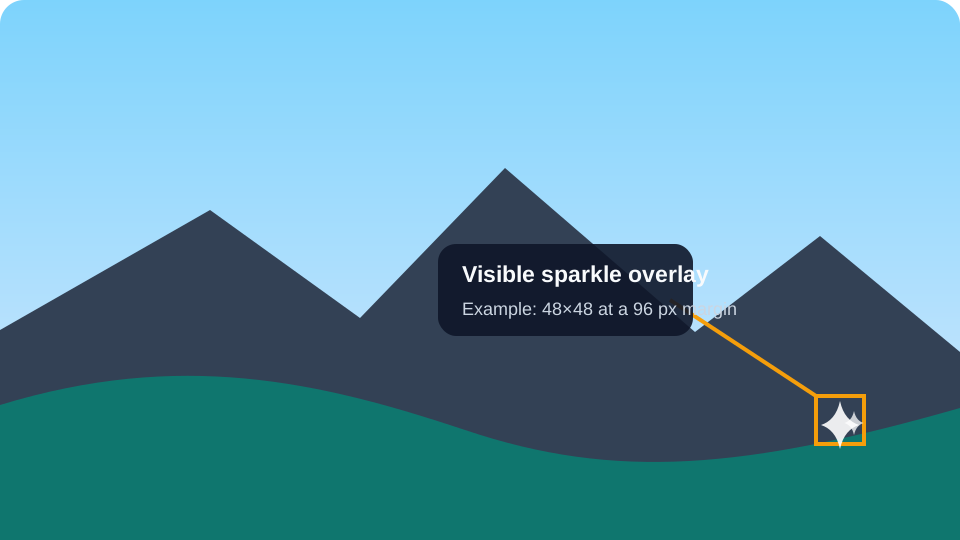
The measurement anchor matters. If you measure to the sparkle’s visible glyph instead of the full soft-edged region, you will get smaller, fuzzier numbers, because the glyph fades out well inside the 48-pixel box. Every offset on this page is measured to the region boundary, not the glyph.
Why other pages say 32 px or 64 px margins
Community tools and older guides publish several different geometry tables. A frequently repeated table says 48×48 with a 32-pixel margin on images up to 1024 pixels, and 96×96 with a 64-pixel margin above that. We did not independently validate those historical profiles, so we do not present a model name or release date as the cause of the difference.
Our July and August 2026 measurements do not reproduce the 32-pixel margin on any supported size; we consistently measure 96 pixels. Our own reconstruction profiles deliberately exclude other geometries so a mismatched profile fails closed instead of silently corrupting the wrong pixels. The disagreement in the wild is not something this page can resolve universally; the safe response is to date-stamp every measurement and verify the box against the actual export.
How to measure it yourself
If you only need the gemini watermark size for one specific image, measuring beats trusting any table — including this one. Open the original export — not a screenshot — in any editor with a pixel ruler, zoom to 400% on the bottom-right corner, and count from the image edge to where the soft halo around the sparkle fully ends. Two practical checks: the file should still be at its generated resolution (1024×1024, 1376×768, 1408×768, or 768×1376 for Gemini Web at the time of writing), and re-saving through a chat app or screenshotting will resample the pixels and shift every number you measure.
If your export matches a supported size, our in-browser tool shows you the same geometry interactively: it draws the fixed 48×48 box on your image and a 4× magnified corner preview, so you can confirm the sparkle sits inside before doing anything else. The same verified profile drives its reverse alpha reconstruction, so what you see boxed is exactly what gets rebuilt. Nothing uploads — decoding and preview run locally.
Curious how that reconstruction differs from the invisible layer? Read how the visible sparkle relates to SynthID.
FAQ
How big is the Gemini watermark in pixels?
48×48 pixels, measured on original Gemini Web exports at 1024×1024, 1376×768, and 768×1376 in July 2026, and re-measured unchanged at 1408×768 in August 2026 after Gemini Web changed its landscape export width. The visible sparkle glyph fades out inside that box, so the glyph alone looks smaller. Older third-party tables list a 96×96 variant for larger images; we have not verified that size.
Where is the Gemini watermark located?
In every Gemini Web export dimension we measured in July and August 2026, it was in the bottom-right corner, 96 pixels in from both the right and bottom edges. On a 1024×1024 export that places the 48×48 region between coordinates 880 and 928 on both axes. Treat those coordinates as a dated measurement, not a permanent product specification.
Did the Gemini watermark move?
Published community profiles report different positions and sizes over time, but we have not independently reconstructed every historical variant. Treat any geometry table — including ours — as valid only for its stated date, product surface, and export dimensions.
Does the Gemini watermark size change with image size?
Not in our tests. The region stayed 48×48 pixels across square, landscape, and portrait exports — on a 768-pixel-wide portrait image it simply occupies proportionally more of the corner. Third-party rule tables describe a larger 96×96 mark above 1024 pixels, but none of our supported sizes triggered it.
Check your own export
The tool draws the verified 48×48 region on your image, magnifies the corner 4×, and shows the exact PNG before any download.
Open the Gemini logo remover